
DIGITAL INFORMATION - Intro to Binary
Much of this lesson comes to us from Code.Org HERE
OPENING QUESTION: What is binary and why do computers use that to process information?
OBJECTIVE: During today's class I will be able to:
- represent decimal numbers using combinations of binary (base 2) digits 0 and 1
- represent binary numbers using combinations of decimal (base 10) digits 0-9
- explain how the position of each binary digit determines its place value and numeric value
WORDS FOR TODAY:
I STRONGLY URGE YOU TO START A DECK OF FLASH CARDS HERE
- innovation: "A new or improved idea, device, product, etc, or the development thereof
- prototype: "A proof of concept"
- CPU: Central Processing Unit
- Binary: 0's & 1's
- Byte: one binary 'word'
- Bit: one binary 'letter' - either a 0 or 1
WORK O' THE DAY:
HERE is one scene from the move "Titanic".
Keep in mind that the movie came out in the late 1990's.
To do the incredible amount of video processing required to complete that scene, the special effects folks REALLY needed a Super Computer. There really are devices out there that are used to model hydrogen bombs, the weather and other super (pardon the pun!) complex calculations-- but they are SUPER expensive.
That's because that each frame had to be animated/changed from the current day back to 1912. The scene is over two minutes long and (I believe) was shot at 60 frames per second. That's a lot of imagery that had to change *seemlessly* which takes a LOT of Computing Power!
Soooooo.... the effects folks working on the scene went down to the corner computer super store and bought a couple of hundred regular ol' computers off the shelf.
They then connected them in a special way (parallel!) and wrote code to divide up the complex tasks of rendering the scene so that the processing load could be divided and conquered by a couple of hundred CPUs instead of running one instruction at a time on a single computer!
HERE is the 2nd scene that shows a bit more processing (beginning about 1:40)
If you'd like to nerd-out on the particular details check out THIS article
═══════════════════════════
► You may know that we communicate or interface with computers via a computer programming language...
Take a quick moment and jot down *quickly* as many computer languages as you can...
It may interest you to know that a VERY early computer language was called, humorously enough "A Computer Language".
Computer jockeys can be a whimsical bunch so that language quickly came to be called "A"
Like many computer programming languages it evolved over time and a next generation of "A" was created and it was named, once again rather whimsically, "B".
"B" didn't work out very well and it didn't catch on and was quickly superceded by..... wait for it...
.....wait for it....
"C"
"C" took the world by storm and was (and still is) widely used. The very robust operating system "Unix" was written in C.
Many of our "old standby" computer programs that we use every day such as Word and Excel were originally written in C (as was Windows).
You may also know that C has itself given way to derivations "C#" (pronounced 'C - Sharp') and C++ (pronounced "C-plus-plus")
═══════════════════════════
Back to binary....
Soooo, once again let's talk binary.
Binary is the way that computers process data by reading a series of 0's and 1's.
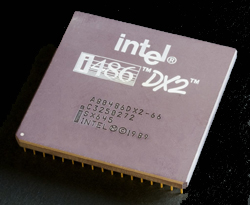
All programming instructions, all data, all input MUST be converted into 0's and 1's in order to be processed by a computer (our laptops have a integrated circuit chip CPU - Central Processing Unit) that does the chore:
Humans don't work in binary very well... it is very hard to read and at least as hard to write.
So we create programming languages that we *can* read and write much more easily.
Those programs are then usually "compiled" into binary so the computer can execute them.
Please have a conversation with your crew.... why binary? Why did early computer scientists choose to use something so difficult to communicate with computers?
═══════════════════════════
Soooo.... we have to learn the basics of binary
Let's do that now:
Please take a copy of this from the back table.
Work with your group to construct a 'Flippy Do'. Instructions are HERE (It may seem a little weird, but hang tough, you'll get it!)
You WILL be tested on your knowledge of binary, octal (a bit less) and hexadecimal on the AP test...
Work with your group to see if you can develop an 'algorithm' (method) to convert numbers from decimal into binary and binary into decimal.... HINT: we'll start SMALL
Convert the following from decimal to binary using your "flippy do"
- 25
- 119
- 6
- 1
Now let's work the other direction and go from binary to decimal
- 00101000
- 10101000
- 00111000
- 10101010
Let's spend some time practicing to and from binary:
- Binary 'words' are almost always represented in terms of 1 byte. 1 byte = 8 binary 'bits'
═══════════════════════════
If time permits we'll discuss the pro's and cons of "Octal" and "Hexadecimal"